Moely Getting Started Guide
Welcome to Moely! This guide will help you get the most out of Moely. We've compiled some of the most common questions from recent user feedback, along with answers and tips. We hope this guide makes every conversation you have with Moely more efficient and smooth.
Key Features
- Multi-model Support: Access GPT, Claude, Gemini, etc.
- Image Generation: Create beautiful images with AI
- Data Ownership: Your data belongs to you
- Web Publishing: Share your conversations and creations
Getting Started
- Sign Up: Create your account
- Select a Model: Choose from our AI models
- Start Chatting: Begin your AI conversation
- Explore Features: Try image generation and other functions
Next Steps
- Explore our Pricing Plans, start for free and pay as you go
- Check out our AI Chat
- Try AI Image Creation
Frequently Asked Questions (FAQ)
Q1: Do I need a VPN to access the Moely official website?
Usually, no.
Moely was initially targeted at overseas users, so the official website is located in Atlanta, USA. Therefore, users in mainland China might experience a slower load time on their first visit. After the first successful load, subsequent use of the service will return to normal. However, we understand that a very small number of users in specific regions may have trouble accessing the site, which is often related to their local network operator.
If you cannot open moely.ai, you can first use the following URL to run a self-check:
https://ping.chinaz.com/moely.ai
After visiting this link, you will see a map of access speeds from various locations across the country:
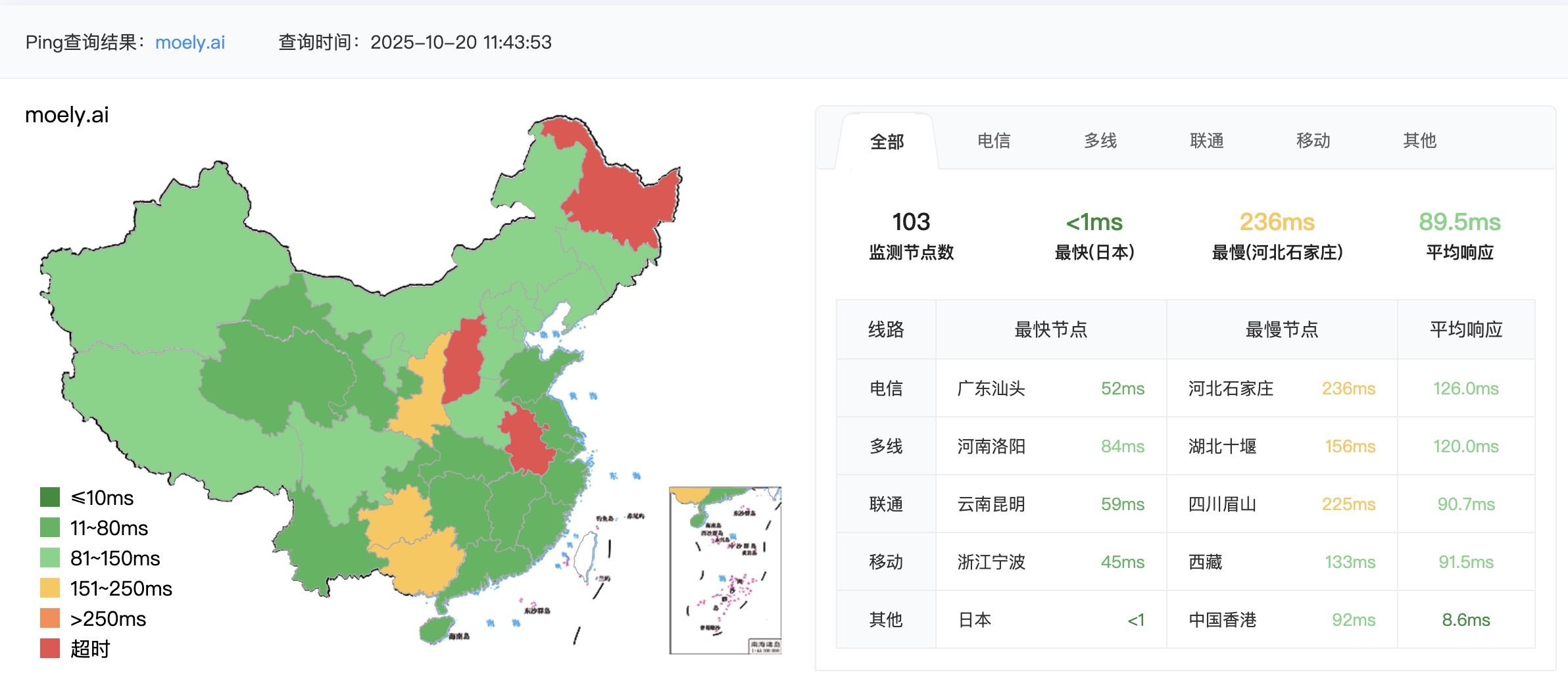
- Green: Access to Moely is very smooth in your area.
- Yellow: Access speed is slow, but the site can be opened.
- Red: Currently inaccessible.
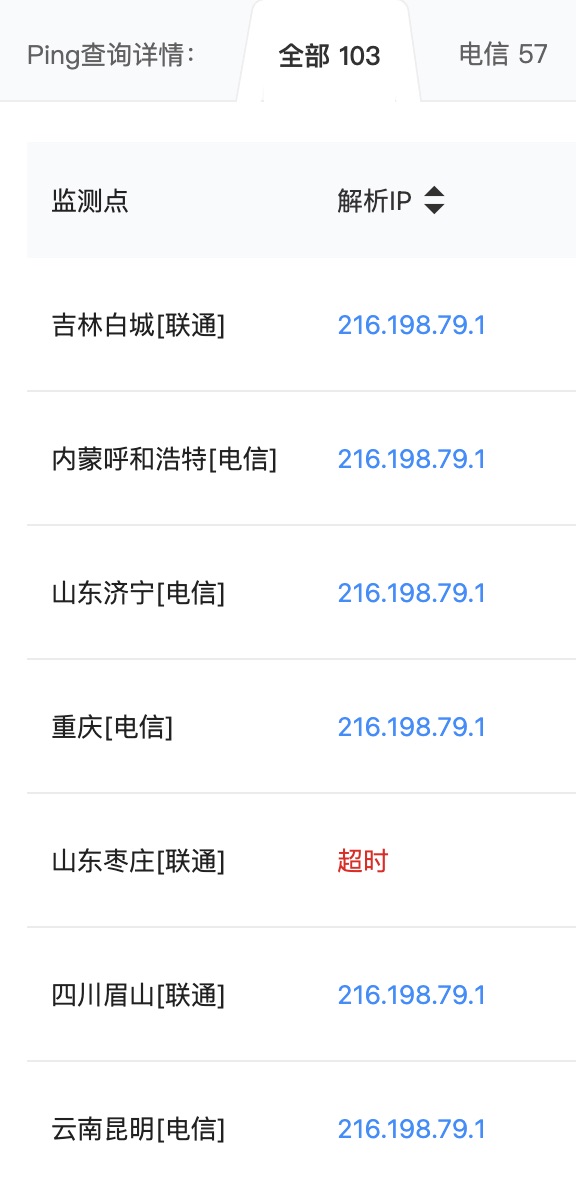
Scroll down the page to see more detailed node information. For example, if you see "Shandong Zaozhuang [China Unicom] Timeout", it means that if you are in Zaozhuang and using the China Unicom network, you cannot access the official website directly and must use a VPN. But this issue is rare, sporadic, and only occurs in specific regions.
Q2: After opening the website, why must I turn off my VPN?
After the website is open, users in mainland China must turn off their VPN!
To optimize the experience for users worldwide, we use a dual-server deployment strategy:
- Guangzhou Server: Serves users in mainland China, Hong Kong, Macao, and Taiwan.
- Silicon Valley Server: Serves overseas users.
When you turn on a VPN, your network request is forced to take a "detour":
- Path without VPN (Faster): Your Location → Guangzhou Server (with Silicon Valley proxy forwarding) → You
- Path with VPN (Slower): Your Location → VPN Server Location (e.g., Japan, USA) → Silicon Valley Server → You
Simply put, accessing the website and using the model service are two different things. You can temporarily use a VPN to access the official site, but once you are on the site, please turn off the VPN immediately. This allows the DNS system to automatically connect you to the faster server, ensuring you enjoy the smoothest model response.
Q3: How can I get faster AI model responses?
Besides turning off your VPN, here are a few more practical tips:
- Start a new chat: If a conversation has too many turns (e.g., more than 20), the context the AI needs to process becomes very large, slowing down responses. In this case, it's recommended to start a new chat for optimal speed.
- Control your input length: The longer your input, the longer the AI takes to process it. Pay special attention to the size of uploaded documents.
- Free Members: It is recommended that a single input or document does not exceed 5,000 characters.
- Subscribed Members: It is recommended that a single input or document does not exceed 20,000 characters.
Q4: The AI feels a bit "dumb" and the response isn't what I want. What should I do?
Optimize your instructions (Prompt). The AI's performance largely depends on how you ask it questions. If you feel the answer isn't ideal, try these methods:
- Treat the AI like a person: Tell it directly what it did wrong. For example: "Your answer is too technical, please explain it in simpler terms." or "This plan isn't specific enough, please add detailed execution steps."
- Give clear correction instructions: Don't just say "that's wrong"; clearly point out the result you want.
To help everyone better command the AI, we are preparing:
- To publish more official guides on how to write high-quality prompts.
- To develop an embedded prompt optimization tool to automatically help you improve your questions.
We hope this FAQ helps! If you have any other questions, feel free to contact us.
Happy exploring!
The Moely Team